Facelift simulator · For practices
The facelift simulatorthat turns website trafficinto consults.
PreviewMD’s facelift simulator is an AI preview tool plastic surgery practices embed on their own website and use in consultations. A patient uploads one front-facing photo and sees a photorealistic preview of their likely facelift result in about 3 to 4 minutes.
No developer needed. Live on your site in minutes.



How it works
How does a patient preview a facelift result?
On your website or in your consult room: one front-facing photo, and a photorealistic before and after with a comparison slider about 3 to 4 minutes later. The photo is processed for the preview and never stored.

They upload a photo
Taken right on the page, following the widget’s on-screen guidance. There’s nothing to download and nothing to book first.

They see their result
A realistic AI preview of what a facelift could look like on their own face. The AI is tuned by a practicing plastic surgeon with decades of experience.
Facelift preview · 2 min on your site
You get the lead
They share their name and contact info with your practice before the preview renders. The lead lands in your CRM while they’re still looking at the result.
The live demo
Try it on your own photo.
The demo runs the same engine your patients would use. Open the live demo, upload a photo, watch the preview render in about 3 to 4 minutes, and judge the quality yourself.
Your photo generates one preview and is never stored. We follow up about PreviewMD by email. Unsubscribe anytime.
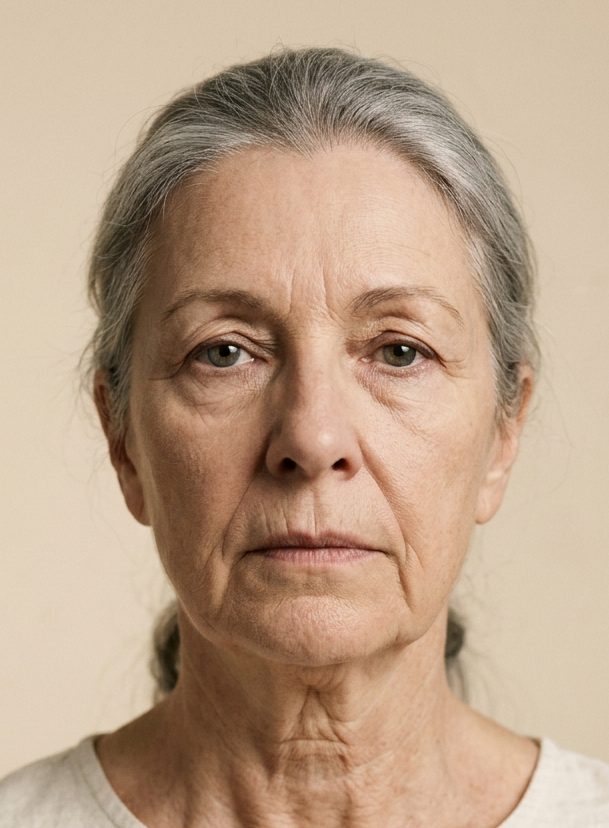
This is a real PreviewMD render.
It was made exactly the way your patients’ previews are made, on a computer-generated face rather than a patient. No retouching, no filter.
Why it reads like a surgical result
The facelift model is tuned to what a lift actually lifts, where the neck tightens, and what a brow lift can and can’t change.
The AI models are fine-tuned with a double board certified plastic surgeon, more than three decades in practice, so the preview reads like a surgical outcome instead of a retouched photo. Separate tuning for men and women keeps the anatomy honest.

For your practice
Every preview is a lead.
A visitor researching a facelift on your website is already close. The simulator gives them the thing a gallery of other patients’ results can’t: their own likely surgical result, on their own face. Before the preview renders, they share their name and contact info with your practice.
The contact info goes straight into your CRM or EMR with the procedure attached; your dashboard shows every capture and the page it came from. Your coordinator follows up with a patient who has already seen a version of their result, and the consult starts from a shared picture instead of a blank page.
Facelift preview · 2 min on your site
Compared with 3D simulation
How is this different from 3D facial simulation?
Crisalix and Canfield’s VECTRA build a 3D model of the patient’s face and morph it, from a set of angled photos or a camera system in the office. PreviewMD generates a photorealistic AI preview from one photo the patient takes themselves. For the wider picture, read what AI actually does in plastic surgery.
| 3D simulation |  PreviewMD PreviewMD | |
|---|---|---|
| Runs inside your own website | Partlya banner links out to their app | Yes |
| No hardware or capture session | Partlysoftware tools still need a photo session | Yes |
| Published monthly price | No | Yes |
| Every preview delivers a lead | Partlytheir patient app captures some | Yes |
| Setup | Three to six photos from set angles, or a camera system in the office | One photo, taken on the patient’s phone |
| Where it runs | In the consultation, or an app you send the patient to | Your website and your consult room |
| Output | Morphed 3D mesh | A photorealistic preview of their own face |
| Pricing | Quoted through sales | Public: $249–$999 per month, 14-day trial |
| Time to live | Onboarding and training, plus hardware for the camera systems | On your site the same day |
See how PreviewMD compares with Crisalix, Canfield VECTRA and Quantificare, or browse every comparison.

Questions
What practices ask.
What is the PreviewMD facelift simulator?
An AI tool your practice offers patients, on your website and in consults, that turns one front-facing photo into a photorealistic preview of a likely facelift result in about 3-4 minutes. It’s built for practices; patients use it through you, not through a consumer app.
How realistic are the facelift previews?
The facelift model is fine-tuned with a double board certified plastic surgeon, more than three decades in practice. Jowl lift, neck definition and fold softening move the way they move in surgery, not the way a filter smooths them. The preview shows a natural surgical direction.
Is the preview a guarantee of my patient’s result?
No, and the widget says so to patients. Previews are visualizations that support the consultation. The surgeon determines what’s achievable for each patient’s anatomy. The preview’s job is to start that conversation.
What would I look like with a facelift?
The most direct way to find out is a preview rendered on your own photo. PreviewMD runs on plastic surgery practices’ websites: upload one front-facing photo there and see a realistic before and after in about 3-4 minutes. Ask your surgeon whether they offer PreviewMD on their site.
How does a patient use it on my website?
They tap the preview button, take or upload one clear photo, share their name and contact info with your practice, and see their before and after with a comparison slider about 3-4 minutes later. You receive the lead either way.
What photos work best?
A clear, front-facing, well-lit photo with the face unobstructed. A phone selfie works. The widget checks the photo before rendering and asks for a retake if it can’t detect a usable face.
Does the simulator store patient photos?
No. Photos are processed to generate the preview and are not retained by PreviewMD.
Can I use it live in consultations?
Yes, and the consult room is where it works hardest. Render the patient’s before-and-after in the room, put it on a screen, and talk through what the procedure addresses while they look at themselves, not a stock photo.
How is this different from FaceTouchUp or consumer facelift apps?
Consumer simulators serve the patient directly and keep the relationship. PreviewMD is your practice’s tool: it runs on your website under your branding, the model was built to a surgeon’s standard before it shipped, and every use delivers a lead to you.
Does the facelift preview show the neck and brow as well?
The facelift simulator shows the neck and brow changes alongside the face, because a facelift produces them from the same operation rather than as separate procedures. What the patient sees is one result: the jawline cleaned up, the neck tightened and the brow sitting where the lift puts it.
Does the facelift preview change the patient’s skin?
The facelift preview does not change the patient’s skin. A facelift moves the structure under the face and leaves the surface alone, so freckles, sun damage, forehead lines and skin texture stay exactly as they are. Clearing pigment or resurfacing skin belongs to a different operation with its own simulator, the CO2 laser resurfacing simulator. A preview that lifted the face and cleared the sun damage in one picture would be showing them a result the facelift will not give them.
Does the facelift simulator work the same way on male patients?
Men and women are handled separately. The same lift reads differently on a man’s face, and older men in particular carry heavy, low brows. Lifting a brow is a different operation from the one the patient asked about, so on a male face the brow stays where it is.
What does the facelift simulator cost?
It’s included in every PreviewMD plan: $249 to $999 per month depending on preview volume and branding, with a 14-day free trial. Full details on the pricing page.
What other procedures can patients preview?
Each additional simulator ships only after the surgeon signing it off. To see every live simulator, check out the simulators page.


See your result before you decide.
14 days free on any plan. Card up front, cancel anytime.